Category Archives: Video

“The Playground” by Tasos Kosmatopoulos

“This is a personal project that I wanted to do for quite some time. Single location in order to get some directed filming, one rider (Panos Manaras) and an edit to combine regular, slow & fast motion. Four cameras and three filmers participated in this in order to cover the angles we thought were the most interesting. Personally I have been riding this ramp since day one when its was more ghetto than ghetto and now after years of reshaping and getting done better I find it very absolutely fun and beautiful. So we used Canon 5D MK2 for details (at 1080p 30p) with a 50mm, Canon 60D for action (at 720p 60fps) with Tamron 24-70mm, Canon 550D with a Samyang 8mm at 720p 60fps on a ProAim crane and I also used a Sony FS700 as main camera & for the slow motion footage (1080p at 240fps) with Sigma 70-200 2.8 and Canon 17-35mm lens. We also used a dolly called Eazy Dolly which is an amazing tool and very smooth for the majority of our shots. I used a ProAim crane in order to get some shots of the whole ramp from above and some action on the spine (icepick over to over, and some flow riding). Quite a lot of things where also filmed on hand in order to give an edgier look on action. A note from my experience with FS700 is, its unique picture quality, dynamic field and colour depth. We didn’t use any external recorders in order to get even higher quality (through HDMI uncompressed 100MBPs 4:2:2 footage) but even with an SD card 28Mbps and 4:2:0 chroma the footage from that camera is superb. I realized it even more while colour correcting the footage. Everything was shot on neutral-flat picture style (sharpness to -4, saturation -4, contrast -2 and colour tone to 0). I use Adobe Premiere CS5 to edit and this video was edited at 720p and 30fps. I feel that 1080p footage downscaled to 720p is somehow nicer and crisper but this is an unscientific point of view. Although in europe we use PAL system I also wanted those NTSC extra 10 frames to help on slow motion and since its uploaded on the web it doesnt even matter. Editing wise having footage from 4 cameras can get tiring in order to decide the clips to use. Also its quite difficult to make the picture match as all these cameras have different sensors and the lenses were also different, but in the end its a nice experience and you can learn a lot of new stuff to add to your workflow.”

Rider: Panagiotis Manaras
Direction – Photography – Editing by Tasos Kosmatopoulos
Photography by Leonidas Germanopoulos
Photography – Crane operation by Dimitris Katranidis

AveBMX Shop Commercial

http://vimeo.com/61093848

No riding here, but a masterfully produced commercial for the AveBMX Shop in Poland. Reminds me of an Oceans Eleven type montage- keeps the viewer intrigued and watching closely. A good mix of panning and glidecam shots, a variety of lenses and a good story line. All-in-all, the best advertisement for a BMX shop I’ve seen in a long time.

In Focus: Video Editing Basics

FLIP CLIPS SIX – FREE SANDWICHES*

This one spans over half a year with footage from all over the East Coast into Ohio, Kentucky and Indiana. Features include a day in Williamsburg with Ewip, a pegless session at Ollie’s skatepark, a Craig Passero skate section and a Daily Grind rail romp in North Carolina.

*Sandwiches are free when you pay shipping and handling. Premium cheeses are available at a nominal cost.

“Nick Tingren – 4 Hours” by Rupert Walker

Rupert Walker did an amazing job with the filming and editing of this four hour skatepark session in Coquitlam, BC. The whole foggy ambiance gives a slightly eerie energy that is perfectly counterbalanced by the soundtrack. One or two of the freehand shots are questionable, but the static tripod shots more than make up for it. With peaceful interludes and well-timed cuts, this edit is more for the cinematographer than the rider (no offense to the riding).

Image

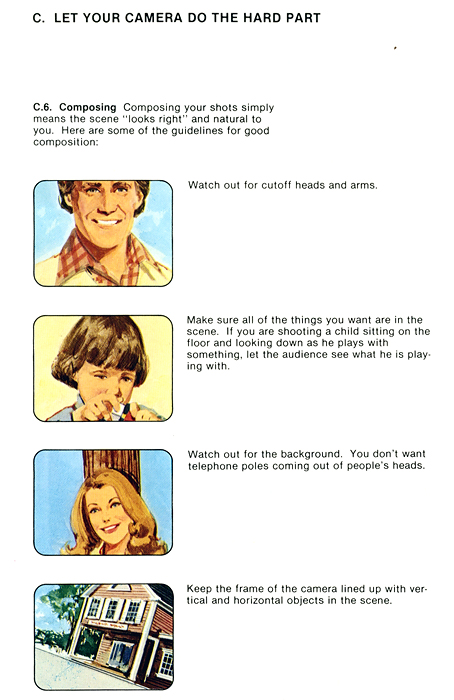
Let Your Camera Do The Hard Part

In Focus: Slow Motion With Russell Houghten

Russell Houghten takes us through some detailed methods of getting a smooth slow motion shot. First he shoots the same scene with four different cameras and compares their abilities to slow the motion (LOL at the VX glitching). He then takes us into After Effects and describes, very graphically, the coveted ramped slow-mo technique.

Rob DiQuattro’s Camera Bag And Workflow

Linking up with Rob while he’s in the field is no easy task- As you can tell, he’s got more cameras than hands, and numerous important deadlines to meet. Luckily I caught him while traveling slowly in rainy interstate traffic for a few minutes of his time. Enjoy a look at some of the prototype lenses and extended life batteries that power his vision.

We also spoke for a few minutes, off the record, about his unconventional video workflow, which includes compressing with iMovie.

“iMovie is a really good compressor, you just have to trick it into being good.”

Rob’s technique involves laying both HD and SD footage (a typical mix in his edits) in an HD timeline, and exporting from Final Cut, uncompressed, in two minute segments. He swears that he can achieve far superior image quality if he exports with increments not exceeding 120 seconds. These segments are then imported to iMovie and compressed with normal HD settings, utilizing the popular H.264 codec. He then pieces the segments back together in Final Cut, and exports uncompressed. Obviously he bumps up the “fun” filter about five or six points, then uploads to Vimeo.

His self-proclaimed magnum opus of standard definition is the No Peg Left Behind Campaign Ad he created for 14th Division Street Controller Nominee Damian Racut.

Rob insists that Cali’s Patrick Taber had used the HD timeline technique in an SD edit many years ago, prompting his own research into negating Vimeo’s backend compression.

DV Breakthrough: The Navimeo Method

Late yesterday, Ryan Navazio publicly announced a workflow for standard definition footage to yield better results after being uploaded to Vimeo- Trick the uploader into thinking it’s working with an HD video.

He went so far as to re-upload the Talk Is Cheap Promo, with positive results.

Visit The Navi Arm for more in-depth coverage of Navaz’s export settings.

In Focus: Filming Lines At Night

Manzoori goes through pretty much every option you have for on-camera lighting and breaks them down with examples. He even goes into the post-adjustments he makes to compensate for the grain incurred when shooting at higher ISO’s. All-in-all, an extremely advantageous episode.